How To Retrieve SQL Password Is The Best Forget The Rest!
Our SQL Password Recovery Software is there for you that give you the opportunity to recover SQL Server login password without the restriction of password protection. Only here, you get the block of how it works section which is very beneficial for choosing our software or taking further step. How it works section tells you right way that how to retrieve SQL password? Due to some misappropriation, you have lost your SQL Server password and it sounds crack MS SQL Server password. But with the help of SQL Password Recovery Software, you can easily change your SQL Server password in just few seconds.


As our software supports all SQL Server editions, SQL users can easily Reset SQL Server 2008 Password. After the reset procedure, SQL users can now access their account as the password which was set earlier has been removed. This SQL Password Recovery tool is equipped with lot of attributes, due to which SQL users use the software without any hitch whenever needed. This tool can easily resolves your query that how to retrieve SQL Password of SQL Server users appropriately.
This Block Explains You the Process When you're Out of Time
Firstly, you can recover SQL Server login password by going to Start menu » Programs » SQL Password Recovery Software.

Next option is to Browse the MDF file to load it.
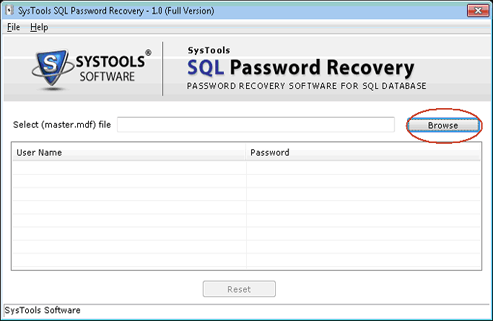
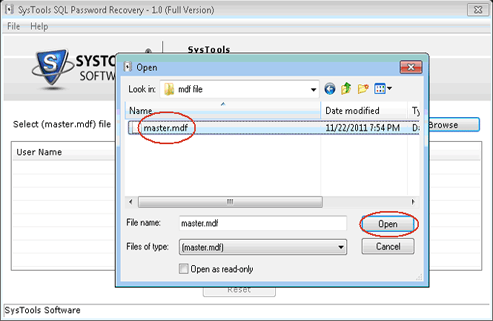
Now you can select that particular Master .mdf file. The User Name and Password information will be enlisted in the panel of the window and then click on Open button.
In SQL Server, a list of all the users has been created by the tool. Unknown and Empty are the two values which was carried out by password column.
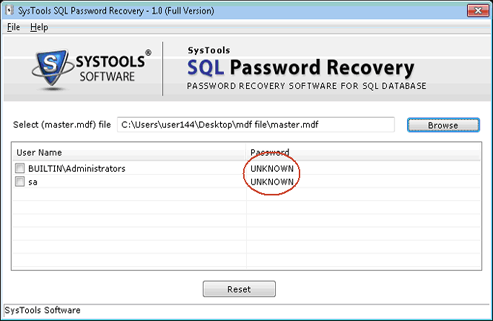
- Unknown stands that you have a password presently but is encrypted.
- Empty stands that you do have a password and you can login to their account without password.
Now take Attention: Further take a step it is highly recommended to take a backup of your Master .mdf and Master_log .ldf files as the tool will make changes to your Master database in the next step.
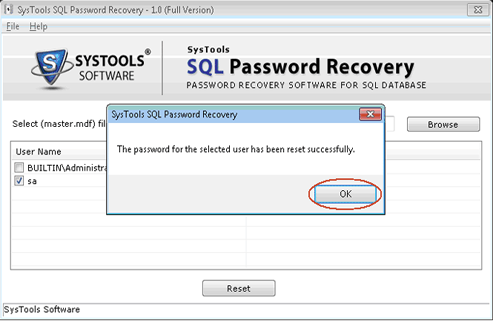
Now select the user whose password you want to reset. The software will show you an alert to take the backup of the Master .mdf and Master_log.ldf.
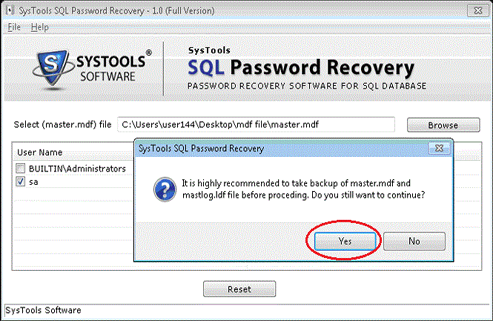
- After continuation, you will set an Empty password for the selected user. Click Yes and go for Reset option.
- Empty password for the selected user has been set by the tool.
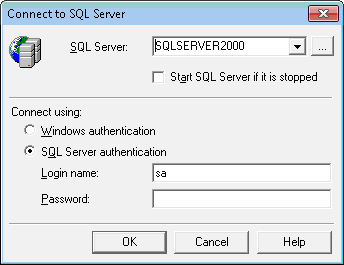
Now log in to the SQL Server without the restriction of password protection
- Overview
- Download
- How it Works
- Purchase

Personal License($69)- For single computer.
Business License($199)- For multiple computers at same location.